
Intro
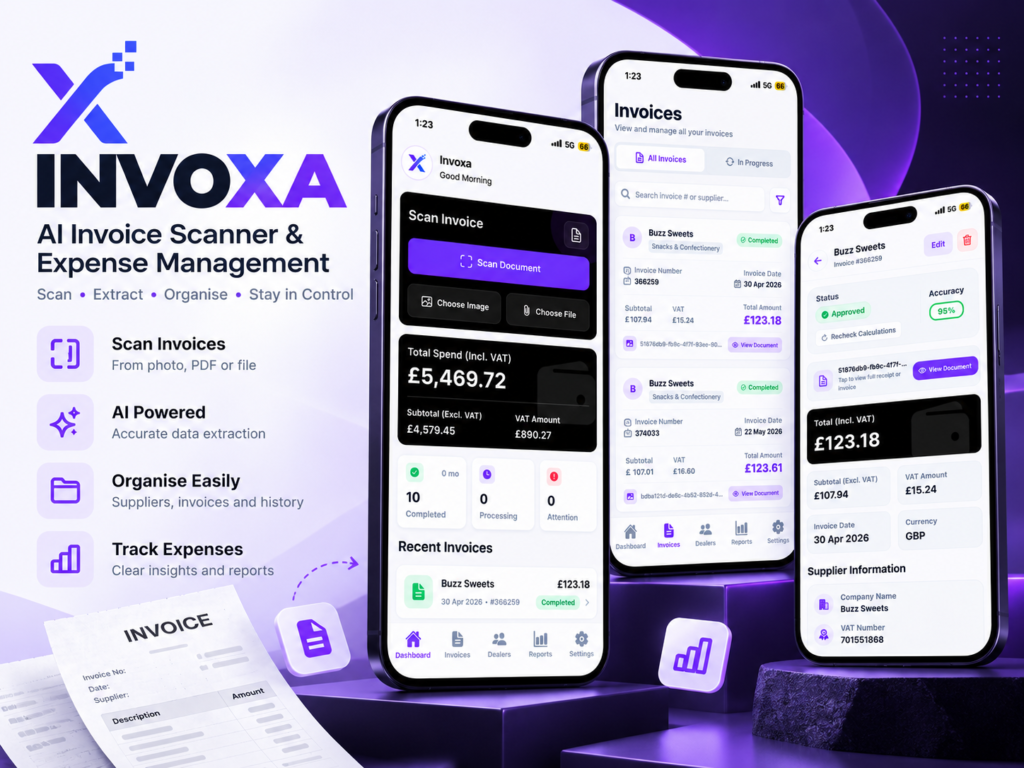
Invoxa is a mobile invoice scanner app that turns paper and PDF invoices into organised, searchable financial data. Users scan with the phone camera, upload from the gallery, or import PDF and image files. AI-powered OCR then extracts supplier details, invoice numbers, dates, VAT, totals and line items automatically. I designed and built the app with Expo and React Native, backed by Firebase and a server-side AI document-processing pipeline, for freelancers, small businesses, accountants and SMEs who want to stop typing invoices in by hand.
The challenge
Small businesses and freelancers often handle invoices as photos, email attachments and scattered PDFs. Entering supplier names, VAT amounts and totals manually is slow and error-prone. Duplicate invoices slip through, and spending reports are hard to trust. The goal was an invoice management app that captures documents quickly on mobile and delivers clean, validated data with minimal manual work.
Our solution
Invoxa combines mobile capture with an AI-powered invoice processing pipeline:
- Google Cloud Document AI reads the document and performs OCR.
- Gemini AI structures and organises the extracted fields.
- Validation and duplicate detection check results before they reach the user's records.
- Review handling flags uncertain invoices so users can correct them quickly.
Key Features
Flexible invoice capture
Scan invoices with your phone camera, upload images from the gallery, or import PDF and image files. Preview documents before starting the processing workflow.
Automated invoice data extraction
Extract supplier details, invoice numbers, dates, VAT, totals and line items with AI-powered document processing, reducing manual data entry.
Reliable background processing
Resumable uploads and background processing help handle large PDFs and unstable mobile connections, allowing invoice processing to continue without blocking the user.
Validation and duplicate detection
Validate extracted invoice data for consistency and detect duplicate invoices to help prevent the same document from being recorded twice.
Invoice management
Browse, filter, edit and manage invoices in one place. Documents requiring attention can be routed for review instead of silently entering the books.
Suppliers, transactions and reports
Build supplier records, transaction history and product data from scanned invoices. Spending reports help reveal cost patterns and track expenses over time.
Technology Stack
| Layer | Technology |
|---|---|
| Mobile app | Expo React Native |
| Backend services | Firebase |
| OCR | Google Cloud Document AI |
| AI extraction | Gemini AI |
| Processing | Server-side processing Document processing, data validation and extraction workflow. |
How It Works
From invoice capture to organised financial records, Invoxa simplifies every step of your document workflow.
Capture
Scan invoices with your camera, choose images from your gallery, or import PDFs and image files.
Upload
Preview your document before submission. Resumable uploads help handle interrupted connections.
Process
OCR and AI extract invoice details through a server-side pipeline running in the background.
Validate
Check extracted fields for consistency and identify potential duplicates before records are finalised.
Review & manage
Approve or edit invoices, organise supplier records, and keep track of transactions and spending.
Who Invoxa Is For
A smarter way to organise invoice documents for independent professionals, growing businesses and finance teams.
Freelancers
Keep supplier invoices and expense records organised to make financial reviews and tax preparation easier.
Small businesses & SMEs
Manage incoming supplier invoices, track purchases and bring essential records into one workspace.
Accountants & bookkeepers
Work with structured invoice details that are easier to review, check and prepare for bookkeeping.
International teams
Support invoice capture workflows for businesses operating across multiple markets.
Results & Outcomes
Streamline repetitive invoice tasks and build a more organised, reviewable financial record.
Less manual data entry
Extract supplier, VAT, total and line-item details to reduce repetitive typing.
Fewer duplicate records
Use duplicate detection and validation checks to help identify repeated or inconsistent entries.
One mobile workspace
Capture, review and manage invoices while keeping supplier information and spending visible.
Scalable processing architecture
Run OCR and AI extraction server-side rather than relying entirely on the mobile device.
Invoxa is an AI invoice scanner app that captures invoices from camera, gallery or PDF and extracts the data automatically with OCR and AI.
Supplier details, invoice number, invoice date, VAT, total amount and line items.
Yes. Users can import PDF and image files as well as scan with the camera or upload from the gallery.
It runs duplicate detection and validation during processing, and flags questionable invoices for review.
Expo and React Native for the app, Firebase for backend services, Google Cloud Document AI for OCR, and Gemini AI for data extraction.
Yes. Custom invoice scanning and document processing apps can be built to fit your workflow and region.
Invoxa is coming soon
to the App Store
Your invoices, organised with less effort. Invoxa is currently in development and is being built to help you scan invoices, extract key details, and keep your records in one place.
Contact MeIn development · App Store availability to be announced
Invoice Scanning
Capture invoice details with less manual work.
Smart Data Extraction
Extract important information from invoices.
Organised Records
Keep your invoice information organised in one place.